
Kimi K3 in OpenCode
Before you start. Create an account (you get $2 to try), then open Token Management → Create token and copy the key. The key starts with sk-. Endpoints: OpenAI-compatible https://microquickjs.com/v1, Anthropic-compatible https://microquickjs.com. Model ID: Kimi-K3.
OpenCode 1.18.32 and later: pick it from the list
OpenCode bundles the models.dev catalog at build time, and ainetcafe has been in it since 17 September. The first release built after that is 1.18.32 (published 21 September). From there, nothing to configure: export the key and the provider appears.
export AINETCAFE_API_KEY="sk-..."      # add to your shell profile
opencode models ainetcafe              # prints: ainetcafe/Kimi-K3
opencode --model ainetcafe/Kimi-K3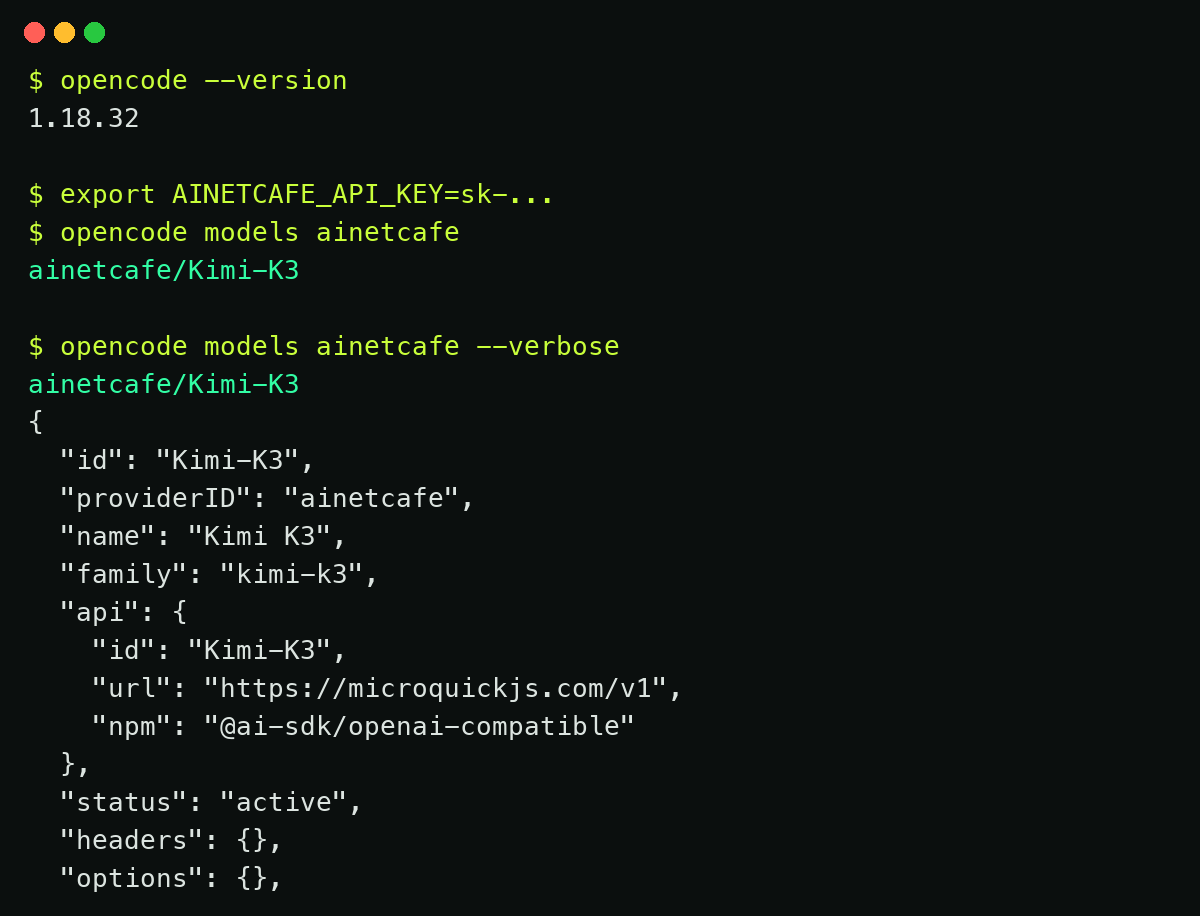
Inside the TUI, /models lists ainetcafe / Kimi K3 once the variable is set; without it the provider is hidden, which is how OpenCode treats every key-based provider. opencode models ainetcafe --verbose shows what the catalog carries for us: $2.10 / $10.50 per million, $0.30 cached input, 262,144 context, 32,768 output, reasoning and image input on. To pin it, set "model": "ainetcafe/Kimi-K3" in opencode.json.
If it says Provider not found on 1.18.32+: check opencode --version, and remove a stale catalog cache at ~/.cache/opencode/models.json (we hit one from February on a test machine; OpenCode rebuilds it).
OpenCode 1.18.31 and earlier: custom provider
Older builds carry a models.dev snapshot from before our entry, so add the provider by hand. Create or edit ~/.config/opencode/opencode.json (global) or opencode.json in the project root (per project):
{
  "$schema": "https://opencode.ai/config.json",
  "provider": {
    "ainetcafe": {
      "npm": "@ai-sdk/openai-compatible",
      "name": "ainetcafe",
      "options": {
        "baseURL": "https://microquickjs.com/v1",
        "apiKey": "{env:AINETCAFE_API_KEY}"
      },
      "models": {
        "Kimi-K3": {
          "name": "Kimi K3",
          "limit": { "context": 262144, "output": 32768 },
          "tool_call": true,
          "attachment": true
        }
      }
    }
  },
  "model": "ainetcafe/Kimi-K3"
}
Export the key in your shell profile so the env: reference resolves:
export AINETCAFE_API_KEY=sk-your-ainetcafe-keyRun opencode, then /models to confirm ainetcafe/Kimi K3 is selected.
Verify the key first
Thirty seconds now saves an hour of guessing later. Run this in a terminal; you should see a short reply and a usage block.
curl https://microquickjs.com/v1/chat/completions \
  -H "Authorization: Bearer $AINETCAFE_API_KEY" \
  -H "Content-Type: application/json" \
  -d '{"model":"Kimi-K3","messages":[{"role":"user","content":"Say OK"}],"max_tokens":5}'
If something goes wrong
| Symptom | Cause | Fix |
|---|---|---|
| 401 Invalid token | Key copied with a space, or key from another site | Re-copy from Token Management on microquickjs.com |
| 403 quota / insufficient balance | Wallet at zero or plan quota used up | Top up in Wallet, or wait for the weekly plan reset |
| 404 model not found | Model ID typed differently | Use exactly Kimi-K3 |
| 429 | Rate limit for your tier | Reduce concurrency; limits rise with spend, or ask for a committed plan |
| Tool calls never happen | Tool calling disabled in the client, or thinking blocks stripped | Keep the client's default tool settings; K3 returns a thinking block before tool_use, do not filter it out |
Still stuck? Email [email protected] with the request ID from the error body.